
Your community archive is a public web page holding every newsletter you've chosen to publish. It gives readers somewhere to catch up, gives search engines something to index, and it's what makes reader polls and ratings work.
Turning it on
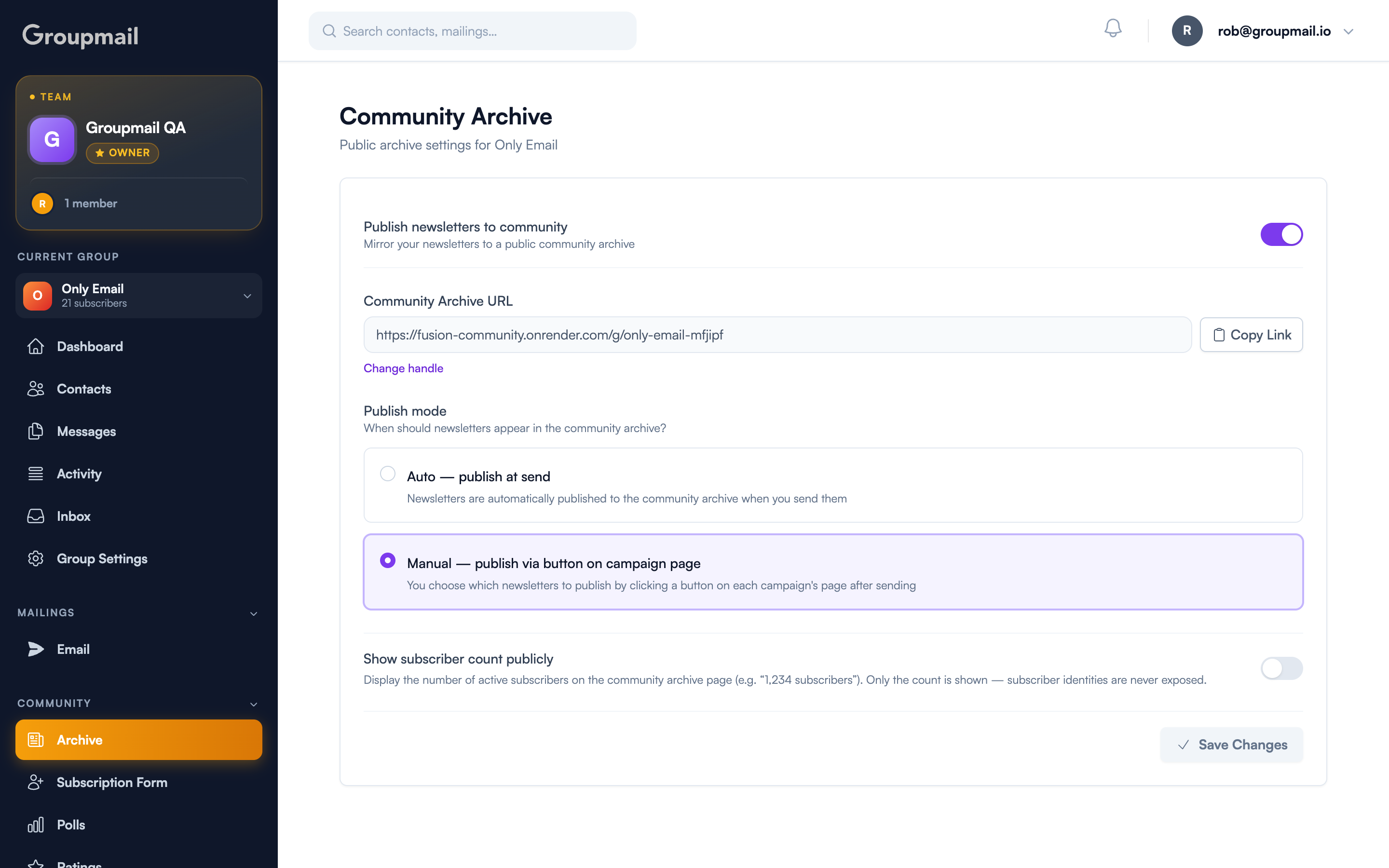
Open Archive under Community in the sidebar, then switch on Publish newsletters to community.
Your archive lives at a URL built from your group's handle — change the handle and the archive URL follows. Copy Link puts it on your clipboard; Change handle takes you where you can edit it.
Auto or manual?
Publish mode decides when newsletters appear:
- Auto — publish at send. Every newsletter goes public automatically when you send it. Right for a newsletter that is public by nature.
- Manual — publish via button on campaign page. Nothing publishes unless you choose it, per campaign. Right when only some issues are for a general audience.
You can also decide per send. The New Mailing flow and the Send modal both carry a Publish to Groupmail Community checkbox, and the wizard summary tells you whether that send will publish. It follows your group's mode by default — pre-checked on Auto, unchecked on Manual — so a one-off announcement can skip the archive without changing your settings.
Showing your subscriber count
Show subscriber count publicly adds a small badge with your active subscriber number to the archive page. It's off by default, and only the number is shown — individual subscribers are never identifiable. The count refreshes when you save group settings.
What readers get
Published newsletters gain a footer toolbar: Read on Web, Forward to a Friend, View Archive, and Unsubscribe. View Archive opens your archive root, so a reader who liked one issue can find every other one. On groups without community publishing the toolbar hides itself.
Polls and ratings render inline on archive pages with live results, and RSS subscribers get a self-updating results image — so a poll still works for someone reading you in a feed reader rather than an inbox.
Unpublishing
Published something by mistake? The campaign detail page has an Unpublish button whenever a campaign has a public archive URL. It removes the public entry without touching the campaign itself, and you can re-publish later.
Confirming what went live
Each publish is recorded in Group Activity as a "Mailing published to community archive" row. Click it to open the public page in a new tab. It only fires on first publish, so retries don't spam the feed.
Quick answers
What is the community archive? A public web page listing the newsletters you've chosen to publish, at a URL based on your group's handle.
Do I have to publish everything? No. Manual mode publishes nothing unless you choose it, and both the New Mailing flow and Send modal have a per-send checkbox.
Are my subscribers exposed? No. Only an optional total count can be shown, and it's off by default. Individual subscribers are never identifiable.
Can I take something down? Yes — Unpublish on the campaign page. Note that "View on web" links in emails already delivered will then 404.
Do I need this for polls and ratings? Yes. Both render live results on the archive, so community publishing must be enabled for the group.