
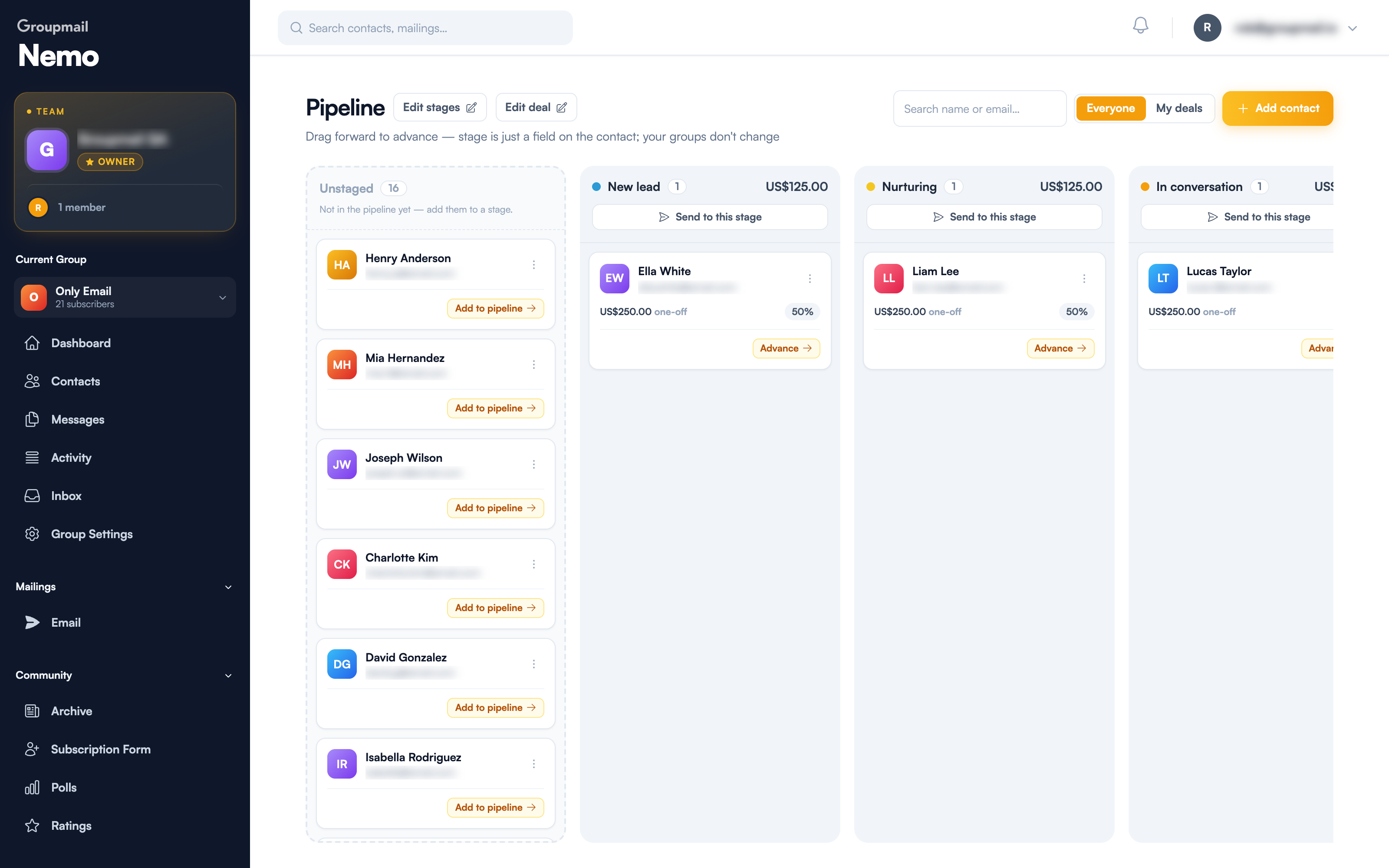
The pipeline board is where you work. Each column is a stage, each card is a contact, and moving a card forward records where that relationship has got to.
Setting up stages and the deal
Before the board opens you set two things:
Stages and probabilities. The defaults run New lead → Nurturing → In conversation → Customer / Member, each with a probability that climbs as the relationship progresses. Rename them, reorder them or set your own — a bookshop's stages look nothing like a membership body's.
The deal. A currency, an amount, and whether it's one-off or recurring. Recurring shows you an annualised value per closed contact, which is the number that matters for a subscription or membership.
Change either later with Edit stages and Edit deal at the top of the board.
Adding people
The Unstaged column on the left holds every contact not yet in the pipeline. It's not a stage — it's your waiting room. Click Add to pipeline on anyone there to bring them in.
Add contact creates a new person and puts them straight into the pipeline.
Don't feel obliged to stage everyone. A pipeline with your twenty live conversations in it is more useful than one containing your whole list.
Moving people forward
Two ways, both doing the same thing:
- Drag a card into another column
- Advance → on the card, which moves it one stage along
Here's what doesn't happen: nothing changes about your groups. As the board says, stage is just a field on the contact. Moving someone from Nurturing to In conversation doesn't subscribe, unsubscribe, or move them between lists. Nobody gets an email because you dragged a card.
Reading the columns
Each column header shows the number of contacts in that stage and its weighted value — the deal amounts multiplied by that stage's probability. A column with four people at a 50% stage shows half their combined value.
Each card shows the contact, the deal amount, whether it's one-off or recurring, and the probability that applies.
Emailing a whole stage
Send to this stage at the top of any column starts a campaign to everyone currently in it.
The audience is built when you send, so it's always current — no group to create, nothing to prune when someone advances. This is the pipeline's real payoff:
- A nudge to everyone stuck in New lead
- A different message to those In conversation
- A welcome to everyone who just became a Customer / Member
Filtering the board
Everyone / My deals toggles between the whole pipeline and the contacts assigned to you — useful on a Teams plan where several people share one board. There's also a search box for finding someone by name or email.
Quick answers
Does moving a contact between stages affect my mailing groups? No. Stage is a field on the contact; your groups don't change.
What's the Unstaged column? Contacts not yet in the pipeline. Use Add to pipeline to bring one in.
How do I email everyone at one stage? Send to this stage at the top of that column. The audience is built when you send.
Can I change stages after setting them up? Yes — Edit stages on the board. Deal values are under Edit deal.
What does the value in a column header mean? The deal values of everyone in that stage, weighted by the stage's probability.
What's the difference between one-off and recurring? One-off counts the deal once. Recurring shows an annualised value per closed contact — the right choice for memberships and subscriptions.
Can two people work the same pipeline? Yes, on Teams. Assign owners and use My deals to see just yours.