
When someone replies to one of your mailings, it doesn't vanish into an unmonitored address — it arrives in your group Inbox, alongside bounces and out-of-office replies, sorted so you can tell them apart at a glance.
Where do replies actually go?
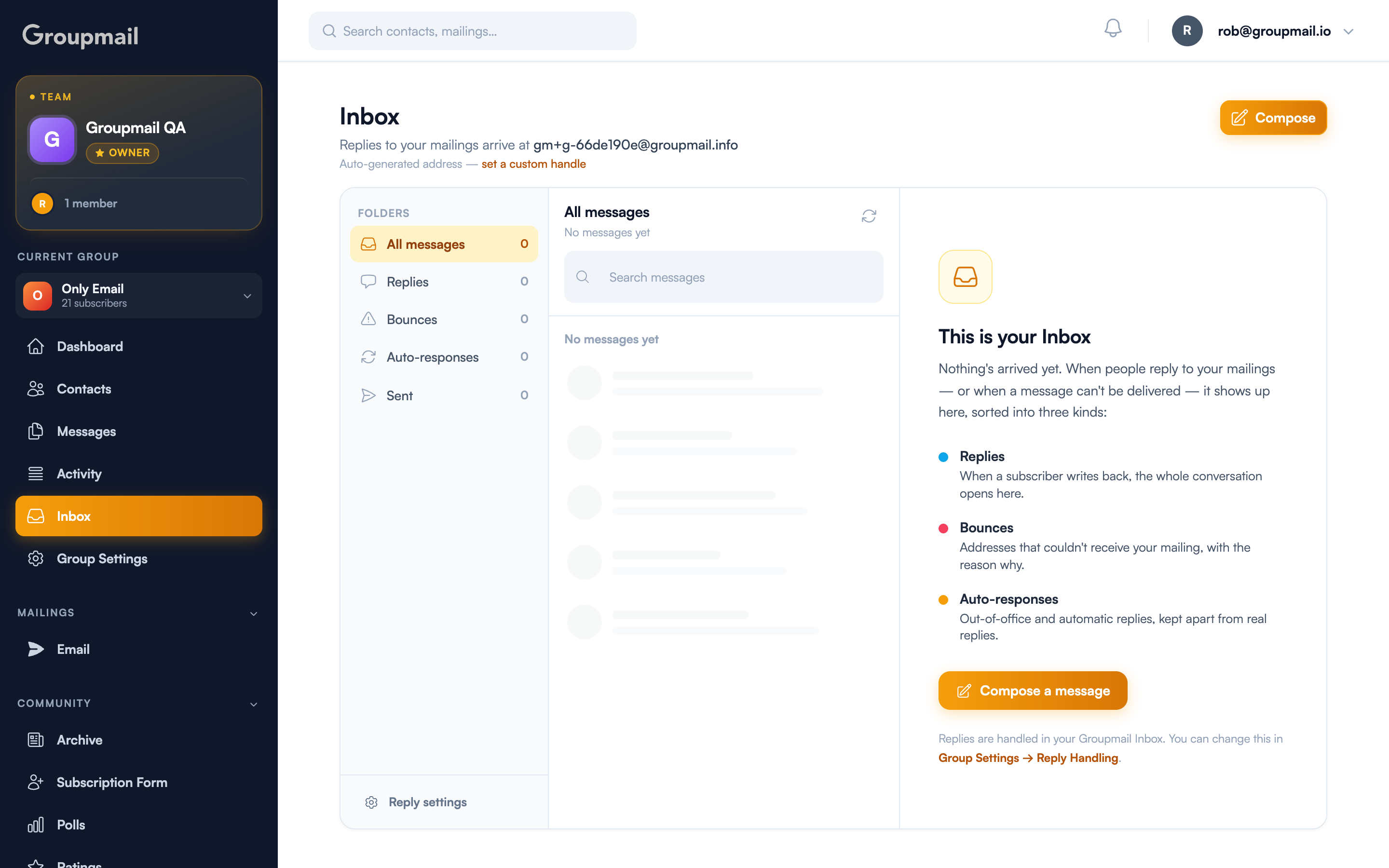
Every group has its own address, shown at the top of the Inbox. If you haven't claimed a handle yet you'll see an auto-generated one like gm+g-66de190e@groupmail.info, along with a set a custom handle link.
Claiming a handle gives you a memorable address instead — see Your Group's Handle and Email Address. Either way replies reach you; the custom one is just the version you'd be happy printing.
The five folders
The Inbox sorts incoming mail automatically:
- All messages — everything, newest first
- Replies — a subscriber wrote back. The whole conversation opens as one thread.
- Bounces — the address couldn't receive your mailing, with the reason attached
- Auto-responses — out-of-office and automatic replies, kept apart so they don't bury real ones
- Sent — what you've sent from here, labelled Sent or Reply so you can tell the direction
Reading and replying
The Inbox is a three-pane layout: folders on the left, messages in the middle, and the full thread on the right. Replies group into a single conversation rather than scattering as separate messages, so a back-and-forth reads as one thread.
To start a fresh message rather than a reply, use Compose — search for any contact by name or email, attach files, and send.
Editing a contact without losing your place
Click a sender's email in any conversation to open their contact card, and edit it right there in a pop-up: name, email, status, tags, custom fields and notes. Your group's own custom field names appear in the editor, and the card refreshes the moment you save.
If the sender isn't in your group yet, Add contact creates them on the spot with the email already filled in.
The point is not having to choose between answering someone and recording what you learned about them.
Turning it off
Reply handling is on by default. To change where replies go, use Reply settings at the bottom of the folder list, or Group Settings → Reply Handling.
Quick answers
Where do replies to my mailings go? To your group Inbox, at your group's own address. If you haven't set a handle, an auto-generated one is used and still works.
What's the difference between the folders? Replies are real people writing back. Bounces are failed deliveries with a reason. Auto-responses are out-of-office messages, separated so they don't bury genuine replies.
Can I email someone who hasn't written to me? Yes — use Compose, search for the contact by name or email, attach files if needed, and send.
Can I edit a contact from the Inbox? Yes. Click the sender's email to open their card and edit in place. If they aren't a contact yet, Add contact creates them with the email pre-filled.
How do I know when something arrives? An unread-count badge appears on the Inbox item in the sidebar.