
The Groupmail CRM is a light layer over the contacts you already have. Stage, opportunity, owner and follow-ups are optional fields on each contact — there are no separate records to maintain and no new groups to keep in sync.
That's the important idea. A contact doesn't stop being a subscriber when it enters your pipeline. It's the same person, with a few more fields filled in.
What you get
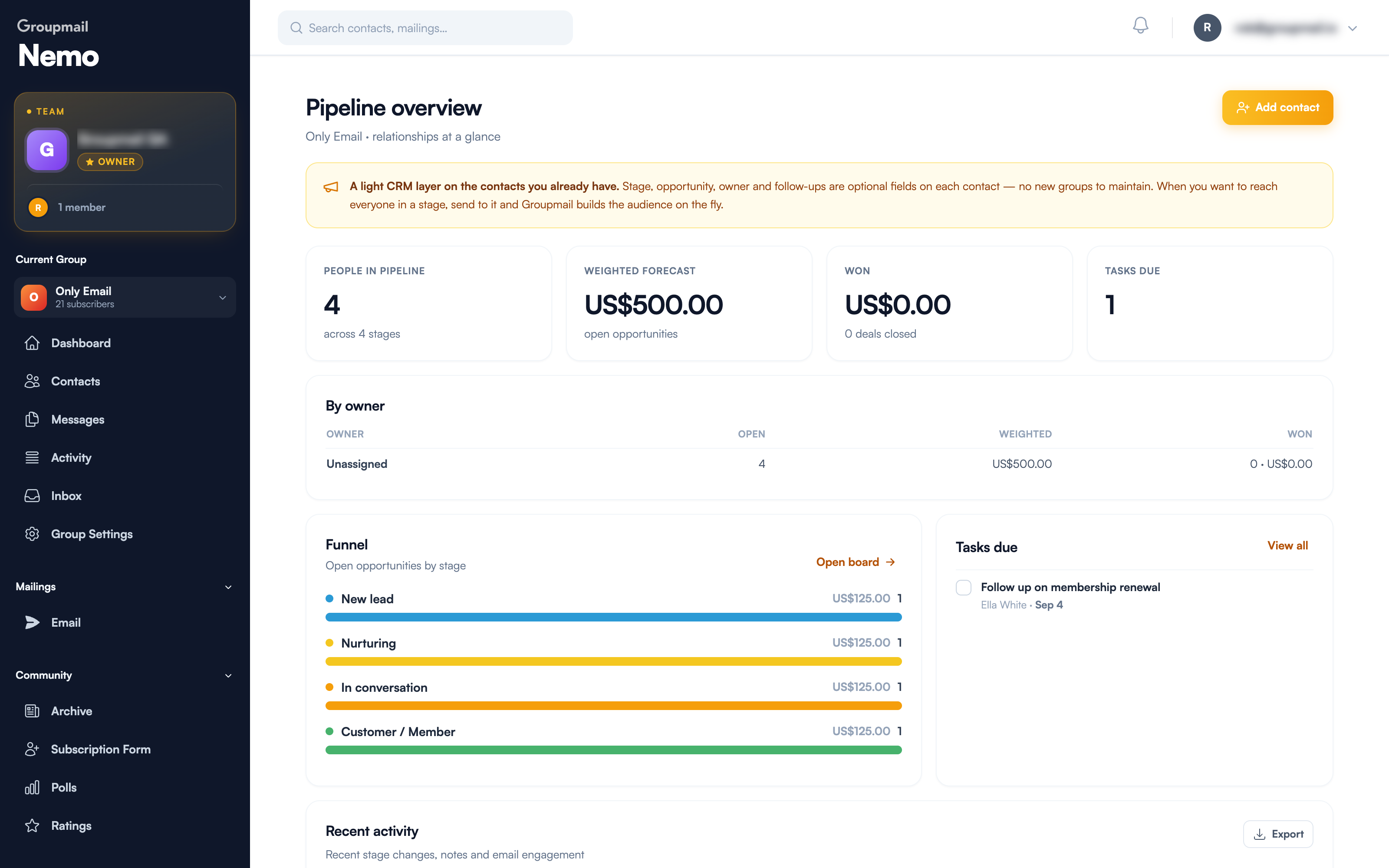
CRM → Overview is the summary view:
- People in pipeline — how many contacts are staged, and across how many stages
- Weighted forecast — the value of open opportunities, adjusted for how likely each is
- Won — value and count of closed deals
- Tasks due — follow-ups waiting on you
Below that, a By owner table breaks open, weighted and won value down per person, a Funnel shows open opportunities by stage, and Recent activity tracks stage changes, notes and email engagement. Recent activity can be exported.
How the weighted forecast works
Each stage carries a probability — a rough sense of how likely someone at that stage is to convert. The default ladder runs from a low percentage at New lead up to a high one at Customer / Member.
Your weighted forecast multiplies each open opportunity by its stage probability and adds them up. Four contacts each worth 250 at a 50% stage gives a weighted forecast of 500, not 1,000.
It's a deliberately pessimistic number, and that's the point. A forecast that assumes everyone converts isn't a forecast.
The part that makes it Groupmail
Stages aren't just labels for reporting — they're audiences you can email.
From the pipeline board, Send to this stage builds the audience on the fly and starts a campaign to everyone currently in that column. You don't create a group, you don't maintain a list, and you don't have to remember to remove someone when they move on. Move a contact to another stage and they're simply in a different audience next time.
That's why the CRM lives inside Groupmail rather than beside it: the follow-up is an email, and the people needing it are already here.
Getting set up
- Open CRM → Pipeline
- Define your stages and their probabilities — or keep the defaults
- Set the deal you're working toward: a currency, an amount, and whether it's one-off or recurring
- Start adding contacts to stages
The board opens once stages and the deal are both set. See Working with Your Deal Pipeline for the day-to-day of moving people through it, and CRM Tasks and Follow-ups for keeping track of what you owe people.
Quick answers
Which plans include the CRM? Business and Teams.
Does adding someone to the pipeline change my groups? No. Stage is a field on the contact. Your groups and who receives your campaigns are unaffected until you choose to send to a stage.
Do I need to create a group per stage? No — that's the thing this replaces. Sending to a stage builds the audience at send time.
What is the weighted forecast? The value of your open opportunities, with each one multiplied by its stage's probability.
Can more than one person work the pipeline? Yes. Contacts can be assigned an owner, and the Overview breaks results down by owner. On a Teams plan the whole team shares one pipeline.
Where do I change my stages? Edit stages on the pipeline board.